 RowLens
See exactly what your app writes to SQLite.
RowLens opens, edits and queries SQLite files of any size in VS Code, free. Pro records every row your app changes, compares databases with migration SQL, and shows what your data really holds.
Free to install, no account needed. Needs VS Code 1.123 or newer.
Careful with your data
A database editor has one job above the others: don't lose anything.
Nothing written until you save
Edits stay in memory. A Save is one transaction, and if your app changed a value in the meantime, it stops and writes nothing.
A way back
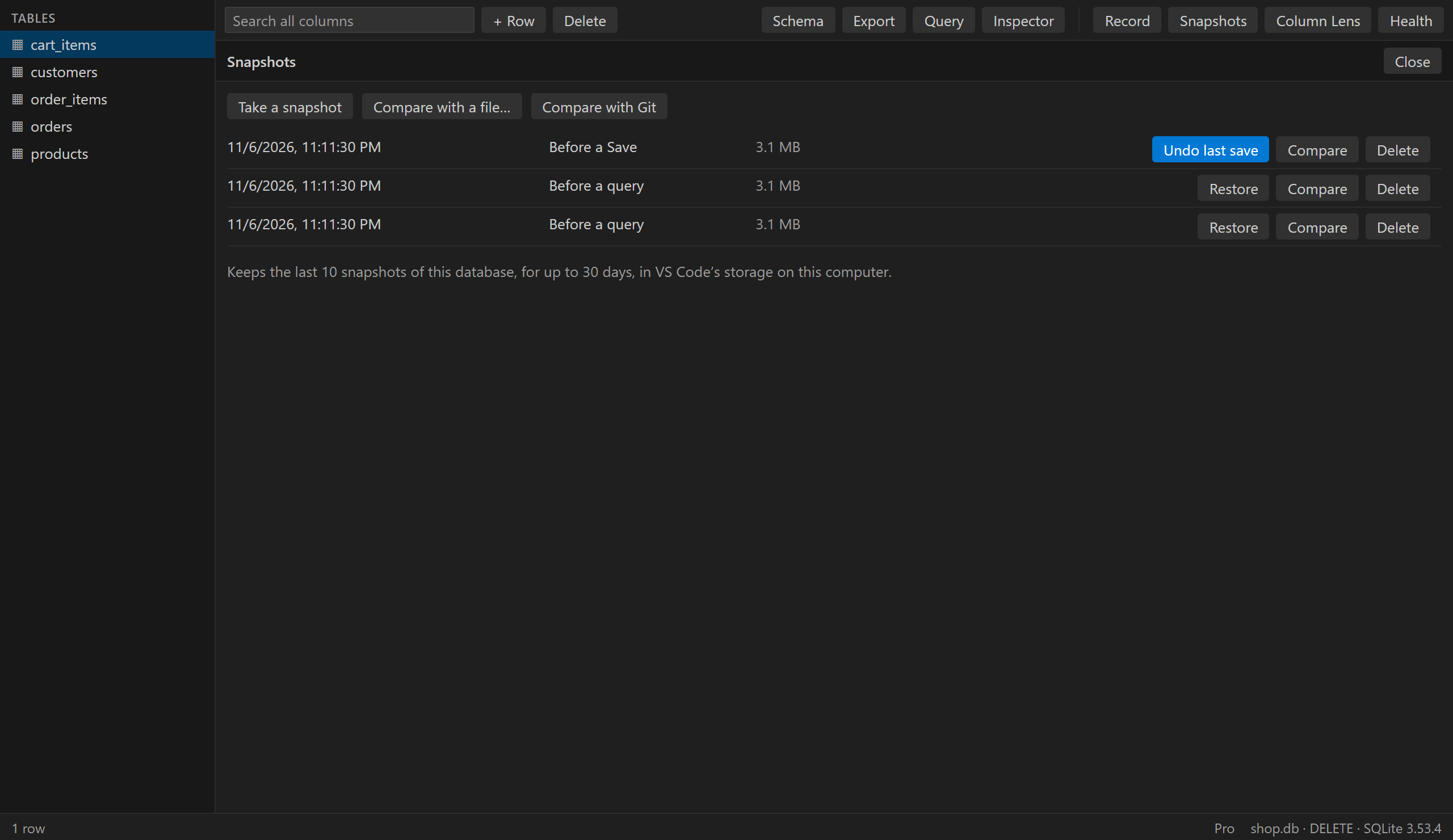
RowLens takes a snapshot before every Save, so you can undo one even after closing the editor. Files over 1 GB are the exception.
Stays on your computer
No account, ads or telemetry. The only thing RowLens ever sends is your Pro license key, to check that it's valid.
What did my app just do?
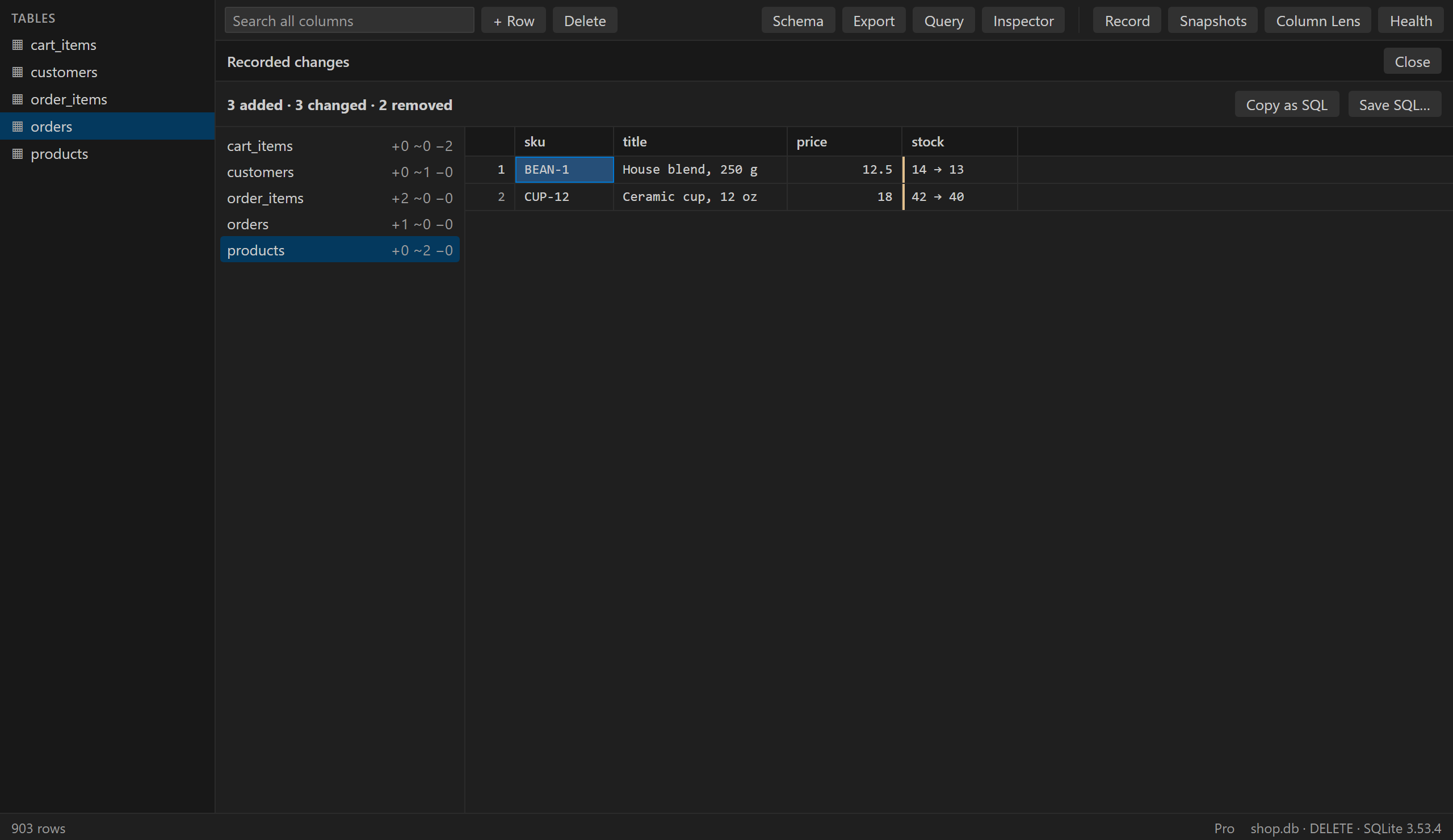
Press Record, use your app, press Stop. RowLens shows every row it added, changed or deleted, with old and new values and the SQL. It adds no triggers and doesn't touch your app's code.
Free
- Opens any sizeDouble-click a .db, .sqlite or .sqlite3 file. RowLens only reads what's on screen, and it has scrolled to the end of 7 million rows.
- Filter, search and sortPer column, or across every column at once.
- Edit with undoChange, add and delete rows, then save them in one transaction.
- Query consoleAutocomplete for your tables and columns, and a Stop button. Read-only unless you allow writes.
- Undo last saveThe file goes back as it was, even after you close the editor.
- Export and copyCSV, JSON, SQL and Markdown.
- Reloads by itselfWhen your app writes, the grid catches up.
- Follow foreign keysJump to the referenced row, preview images, format JSON.
Pro PRO
- Change RecorderEvery row your app added, changed or deleted, and the SQL to replay it.
- SnapshotsThe last 10 versions of a database, with one-click restore.
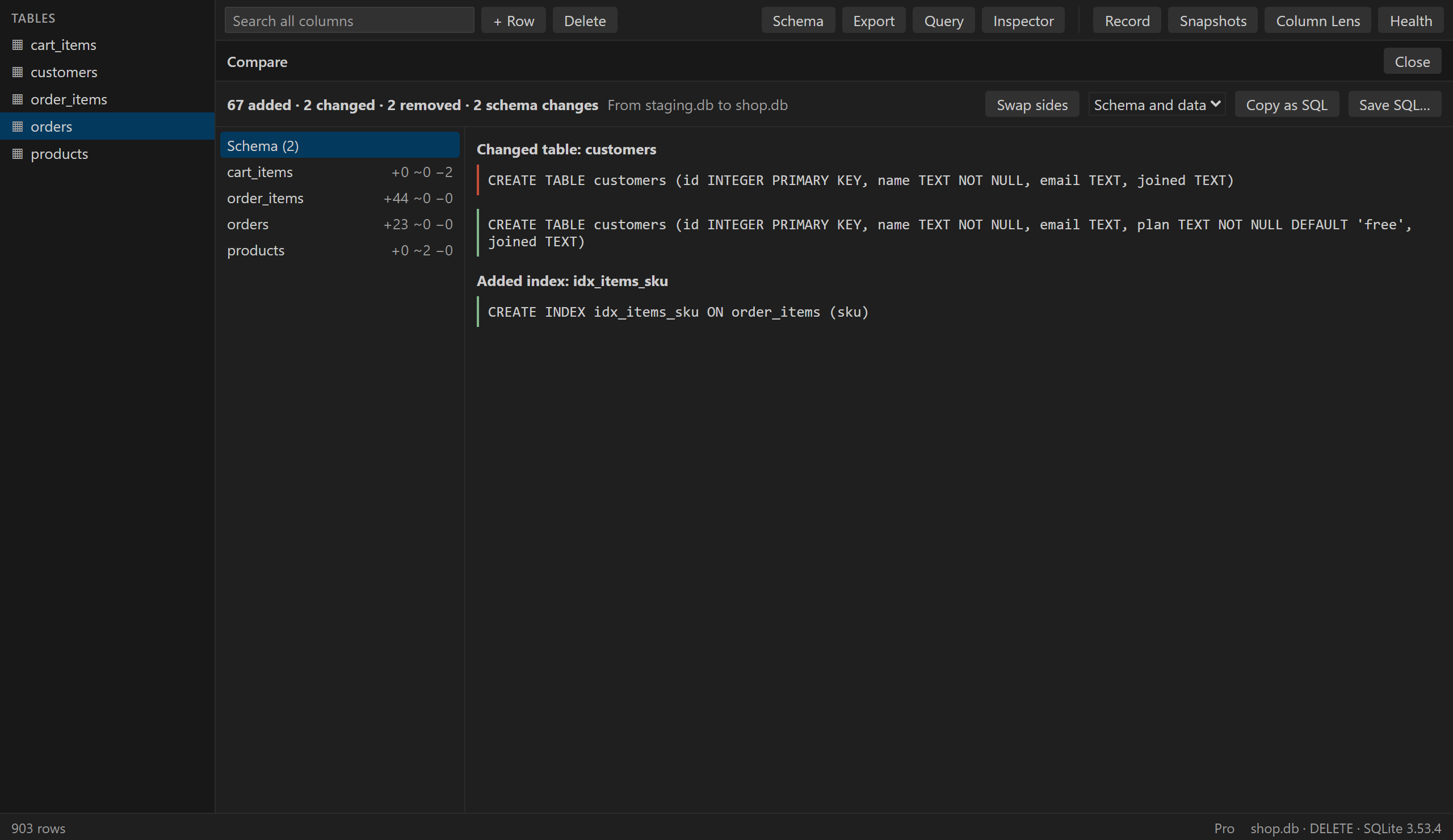
- CompareDifferences in schema and data against a snapshot, another file or the version in Git.
- Migration SQLSchema only, or schema and data. RowLens tries it on a copy first, and tells you if the result isn't exact.
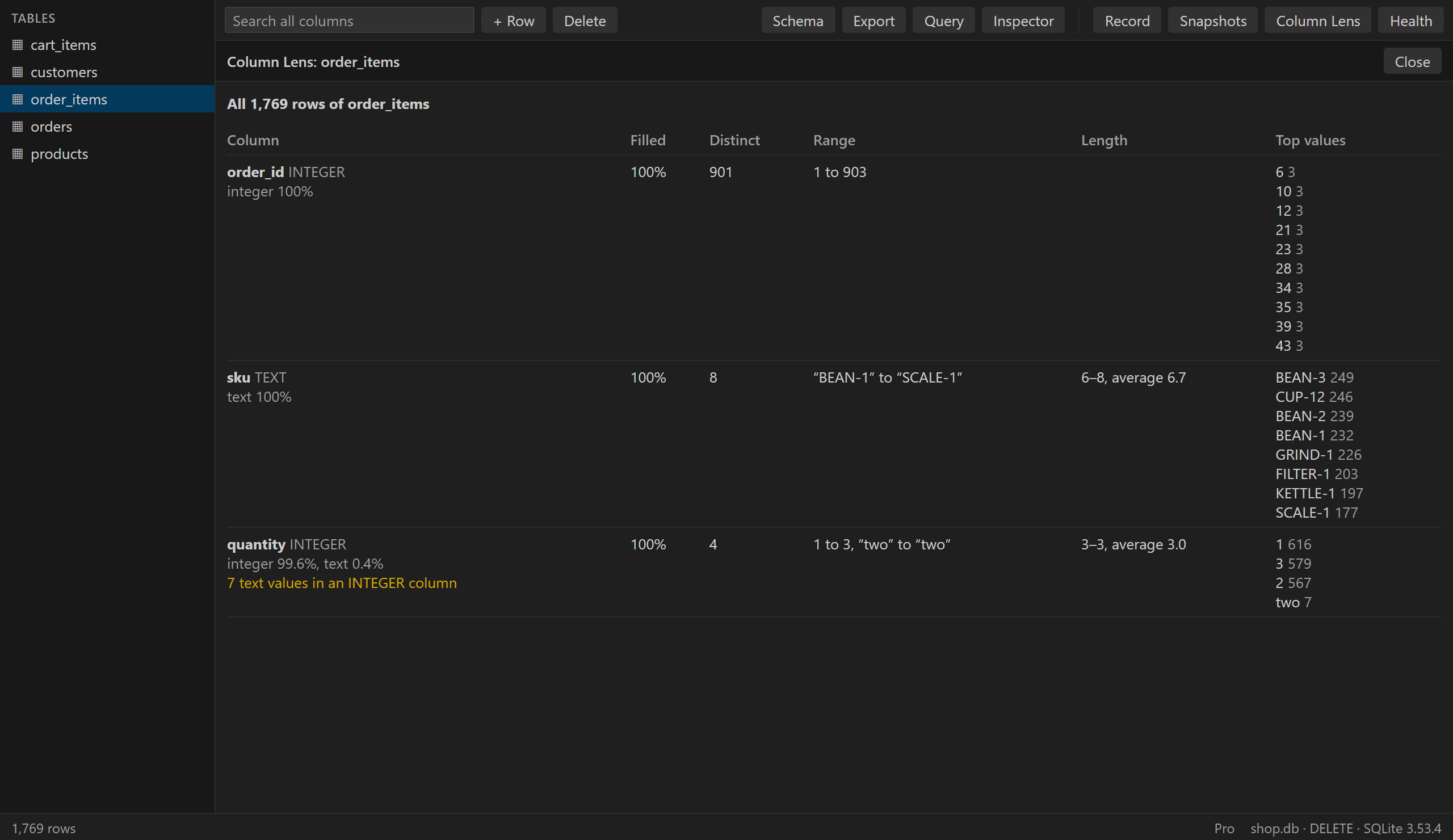
- Column LensNulls, distinct values, top values, ranges and lengths, and values that don't fit, such as text in an INTEGER column.
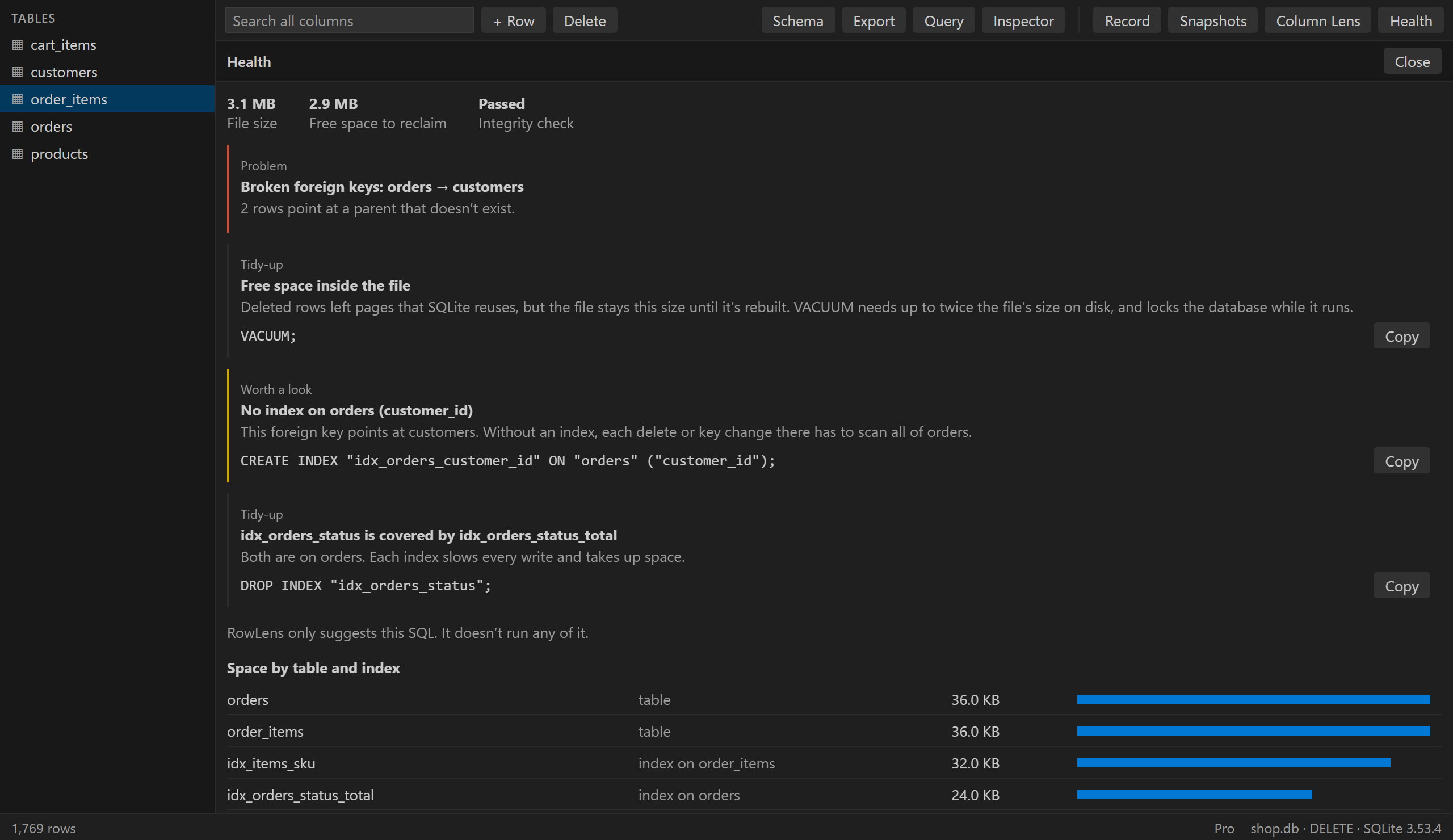
- HealthSize by table and index, integrity, broken foreign keys, missing and duplicate indexes. It suggests SQL and never runs it.
Try it free: 3 Pro uses a day, no key needed.
Pricing
The editor is free, with no limits on size. Pay only if the Pro tools earn it.
Free
$0
Forever
- Files of any size
- Browse, filter, search and sort
- Edit, add and delete rows, with undo
- Query console with autocomplete
- Undo last save
- Export to CSV, JSON, SQL and Markdown
- 3 Pro uses a day
Pro
$39 / year
or $79 once, with no renewal
- Everything in Free
- Change Recorder
- The last 10 snapshots of each database
- Compare with a snapshot, a file or Git
- Migration SQL, tried on a copy first
- Column Lens
- Health report
14-day money-back guarantee. Cancel the yearly plan anytime. One license works on up to 3 computers. Taxes may apply. Checkout and billing are handled by Lemon Squeezy.
Questions
Does the Change Recorder touch my database or my app?
It adds no triggers and changes nothing in your file or your code. It takes a private copy when you press Record and another when you press Stop, and compares the two. In WAL mode your app notices nothing. In other journal modes, your app's writes wait while each copy is made, which took about 6 seconds for 1 GB in testing, so a very large database with a short busy timeout could see "database is locked".
Does it show every statement my app ran?
No. It shows what changed between Record and Stop, so a value that changed and changed back won't appear. It's the rows you end up with, not a log of statements.
How big a file can it open?
There's no limit in RowLens. It reads only the rows on screen, so a 1 GB file with 7 million rows opened in under a second in testing, with memory use up by about 30 MB. Comparing two copies of that file took 13 seconds.
What if my app writes while I'm editing?
Your edits stay in memory until you save, so RowLens holds no lock in the meantime. Each update checks that the value is still the one you saw. If your app changed it, the Save stops, writes nothing and keeps your edits.
Where do snapshots go?
In VS Code's storage on your computer, not in your project, so they can't end up in a commit. They're full copies of the database. RowLens keeps the last one for free and the last 10 with Pro, for up to 30 days and up to 4 GB per database. You can delete them from the Snapshots panel.
How far can I trust the migration SQL?
Before you get it, RowLens runs it on a copy and compares the result with the target. It tells you if the result is exact, if it isn't, or if the script is over 64 MB and too large to try. Read it and keep a backup all the same. A renamed table shows up as one table removed and one added.
What counts as a Pro use?
Starting a recording, taking a snapshot by hand, or running a comparison, Column Lens on a table, or Health. Opening the same comparison, table or report again on a file that hasn't changed is free. The count starts again at midnight. Undoing a Save and restoring a snapshot are always free.
Which editors and systems does it work on?
VS Code 1.123 or newer, because RowLens uses the SQLite built into it. It's tested on Windows. It has no native code, so it should run the same on macOS and Linux, and over Remote SSH, WSL and dev containers, but those aren't tested yet. Cursor and other editors can install it from Open VSX if they run Node 24.12 or newer, and RowLens tells you if yours doesn't.
How do I unlock Pro?
Buy Pro, then copy the license key from your receipt email. In VS Code, open the Command Palette, run "RowLens: Enter License Key" and paste it. It's stored in your system's secret store.
Can I use one license on several computers?
Yes, on up to 3. To move a license, run "RowLens: Remove License Key" on the computer you no longer use.
What's the difference between yearly and paying once?
Yearly is $39 and renews each year until you cancel. Paying once is $79, with no renewal, and the license doesn't expire. Both unlock the same Pro, and both get updates.
Does Pro keep working offline?
Yes. RowLens checks your license about once a day, and Pro keeps working for 7 days without a connection.
How do I cancel?
Run "RowLens: Manage Subscription", or use the "Manage subscription" link in your receipt email. Pro stays active until the end of the year you already paid for.
Can I get a refund?
Yes, within 14 days of any payment. See the refund policy.
Is RowLens connected to Microsoft or SQLite?
No. RowLens is an independent tool. Visual Studio Code is a trademark of Microsoft Corporation.